OpenAI Dots for Marketers: How to Build an AI Ad Team, One Dot per Channel (2026)
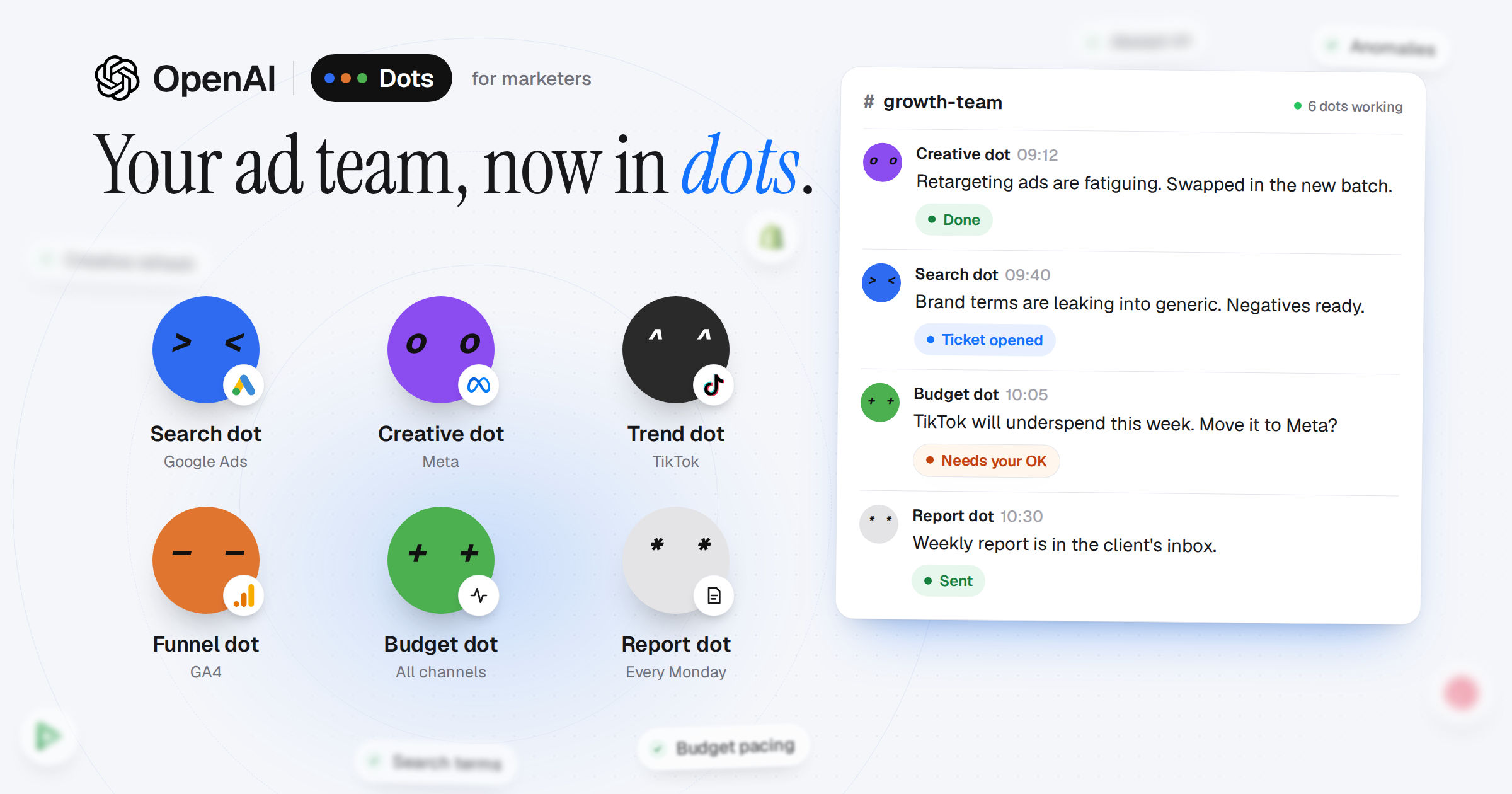
OpenAI Dots are always-on AI agents that keep working in the background, use your connected apps and report back in Slack or Teams. For performance marketing, the useful way to set them up is one dot per job, not one dot for everything: a Search dot for Google Ads, a Creative dot for Meta, a Trend dot for TikTok, a Funnel dot for GA4, a Budget dot that watches pacing across channels and a Report dot for the Monday summary. Each one watches a narrow set of signals, acts alone only on things that cost nothing, and asks you before anything that spends money. To do any of that, a dot has to read your ad accounts, which is what Adstudio connects it to.
TL;DR
- OpenAI announced Dots at DevDay on September 29, 2026. They are available in ChatGPT for Pro and Business Premium users in eligible markets.
- Today you start with one primary dot. OpenAI says teams of specialist dots are coming, so design the team now and run it as routines on one dot until then.
- The six-dot ad team below gives each dot a job, what it watches, what it may do alone and what it must ask first. Copy the instructions as they are.
- The rule that matters most: no dot moves budget, bids or ad status without your OK.
- Dots are only as good as the data they can read. Adstudio gives any AI agent one connection to Google Ads, Meta and TikTok.
What are OpenAI Dots?
A dot is an AI agent that runs on its own virtual computer in the cloud. It can browse the web, use connected apps, create files and run tools, and it keeps track of a project over time instead of forgetting it when you close the tab. OpenAI describes Dots as "always-on agents built to handle everything", powered by GPT-6 Astra.
The difference from ChatGPT or Codex is where the work happens. You do not open a dot, ask a question and wait. You give it a goal and it pursues that goal in the background, then messages you in Slack, Teams or another workplace tool when it has something to show or needs a decision.
What is available today, per OpenAI's announcement and TechCrunch's launch coverage:
- Who: ChatGPT Pro and Business Premium users in eligible markets.
- Where: launched from ChatGPT or Codex, messaged through Slack, Teams and other workplace tools. Text messages are coming.
- How many: you start with one primary dot that you name and shape. OpenAI says it envisions "teams of Dots working together on your behalf" and specialist dots with their own identities, credentials and tools.
Why Dots fit performance marketing
Most of an ad manager's week is not strategy. It is rounds: open Google Ads, check yesterday, open Meta, check frequency, open TikTok, check spend, open GA4, check whether conversions still match, then paste it all into a report. The same checks, every day, across tabs that do not talk to each other.
That is exactly the shape of work an always-on agent is good at:
- It is recurring. The same questions every morning, which makes good instructions reusable.
- It is split by platform. Each ad platform has its own metrics, quirks and failure modes, so a narrow specialist beats a generalist that has to remember everything.
- It is mostly reading. Ninety percent of the job is noticing something changed. The remaining ten percent, the actual change, is where a human should stay in the loop.
A single agent that "manages all your ads" tends to give shallow answers about everything. Six narrow dots give specific answers about one thing each, and post them where your team already works.
The six-dot ad team
| Dot | Owns | Watches daily | May do alone | Must ask first |
|---|---|---|---|---|
| Search dot | Google Ads | Search terms, brand vs generic overlap, CPA change per campaign | Draft negative keyword lists, open a ticket | Any bid, budget or keyword change |
| Creative dot | Meta | Frequency, CTR decay and CPA per ad, last 7 days vs the previous 7 | Flag fatigued ads, brief the next batch | Pausing or launching ads |
| Trend dot | TikTok | Top ads by hook rate and completion, formats rising in your category | Weekly "what to make next" brief | Anything that spends |
| Funnel dot | GA4 | Sessions to key events by channel, landing pages with the biggest drop | Post the leak with the page and the channel | Nothing: it only reads |
| Budget dot | All channels | Month-to-date pacing vs plan, underspend and overspend forecast | Propose a reallocation with the reason | Every budget move |
| Report dot | Reporting | The other dots' posts plus the accounts | Draft the weekly summary | Sending anything to a client |
Search dot (Google Ads)
You own our Google Ads account. Every morning, compare yesterday and the last 7 days with the 7 days before. Check the search terms report for terms with spend and no conversions, and for brand queries showing up in non-brand campaigns. Post only what changed, with the campaign name, the numbers and the date range you used. You may draft negative keyword lists and open a ticket for them. Never change bids, budgets or keywords yourself: post the proposal and wait for approval.
This is the dot most teams should start with. Search term waste is the most common silent leak in a Google Ads account, and catching it is pure reading. The guide to managing Google Ads with an AI agent covers the daily and weekly questions in more depth.
Creative dot (Meta)
You own creative health on Meta. Every morning, rank active ads by spend over the last 7 days and compare frequency, CTR and CPA with the previous 7 days. Flag an ad as fatiguing when frequency keeps rising while CTR falls. Post the list with a one-line reason each, and draft a brief for the replacement: angle, hook, format. Never pause or launch ads yourself.
Trend dot (TikTok)
You own TikTok. Every Monday, list our top ads by hook rate (2-second views over impressions) and completion rate, and what the best ones have in common. Look at what is rising in our category on TikTok this week. Post a short "make next" brief with three concrete ideas. You do not spend money and you do not change campaigns.
Funnel dot (GA4)
You own the funnel in GA4. Every morning, check sessions to key events by channel for yesterday and the last 7 days. Find the landing page and channel pair with the biggest drop in conversion rate and post it with the numbers. If ad platform conversions and GA4 key events diverge by more than usual, say so and name the likely reason (attribution window, date boundary, a broken tag). You only read.
Budget dot (all channels)
You own pacing. Every morning, compare month-to-date spend with the monthly plan for each channel and forecast the month end at the current rate. When a channel will underspend or overspend by more than 10%, propose a specific move (from, to, amount, why) and wait for approval. Never move budget yourself.
Report dot (weekly)
Every Monday at 09:00, write a one-page summary of last week: what changed, why it changed, what we are doing about it. Use the other dots' posts from the week and check every number against the accounts before using it. State the date range and the attribution model. Post the draft in the channel. Never send anything to a client without approval.
The rules every dot follows
Put these in every dot's instructions. They are what separates a useful agent from a confident one.
- Cite the numbers. Every claim comes with the metric, the value, the account and the date range it was read from. A number with no source is not posted.
- Compare like with like. Same length windows, same attribution, same currency. Never compare against a remembered figure or a guess.
- Post only change. "Nothing moved" is one line, not a report. The channel stays readable when dots only speak up about what is different.
- Nothing that spends without an OK. Bids, budgets, ad status and new campaigns are proposals. The person approving sees the before and after.
- One channel, one thread per issue. All dots post to the same channel so they can read each other. The Report dot depends on it.
The read-only vs write access guide goes deeper on where to draw the line for an agent working inside real ad accounts.
You have one dot today: start with routines
The six-dot team is the shape OpenAI says is coming. Until specialist dots arrive, give your primary dot the six jobs as a schedule:
- Every morning: the Search, Creative, Funnel and Budget checks, in that order, as one post with four short sections.
- Every Monday: the Trend brief, then the Report draft.
When you can create more dots, split them along the same lines. The instructions do not change, only who runs them.
How a dot reads your ad accounts
A dot works through the apps it is connected to. Pasting CSV exports into a chat does not work for an agent that runs every morning on its own: the export is stale by the next day, and the agent cannot check a number it was handed.
Adstudio gives any AI agent one connection to your ad accounts. Connect Google Ads, Meta and TikTok in Adstudio once, then add Adstudio to ChatGPT as a custom connector over MCP. The agent can then ask for the exact account, level, metrics and date range it needs, and every answer comes back with its source: platform, account, currency, date range and attribution. You choose whether the connection can only read or can also act, and it never goes beyond your own role in the workspace.
- Setup for ChatGPT: connect ChatGPT to your ad accounts.
- How it works: Adstudio MCP.
- Running this for several clients: MCP for PPC agencies.
Dots are new, so check which ChatGPT connectors your dot can use in your plan before you rely on it. The instructions above work the same with any agent that can read your accounts, including Adstudio's own assistant.
FAQ
What are OpenAI Dots? Always-on AI agents from OpenAI, launched at DevDay on September 29, 2026. Each dot runs on its own cloud computer, uses connected apps and tools, keeps working in the background and reports through Slack, Teams and other workplace tools.
Who can use OpenAI Dots? At launch, ChatGPT Pro and Business Premium users in eligible markets. They are launched from ChatGPT or Codex.
Can I have more than one dot? At launch you start with one primary dot. OpenAI says teams of specialist dots are coming. Until then, run the specialist jobs as scheduled routines on one dot.
Can an OpenAI dot manage Google Ads or Meta Ads? It can monitor and propose changes if it can read the accounts, through a connector such as Adstudio. Whether it should change them alone is a separate question: keep bids, budgets and ad status behind human approval.
Is it safe to give an AI agent access to my ad accounts? It is as safe as the access you grant. Start with read-only access, require the agent to cite every number, and approve every change that spends money. Adstudio's connection lets you choose read only or read and write, and never exceeds your own role.
How is a dot different from ChatGPT agent mode? Agent mode does a task while you wait. A dot keeps a goal over time, works in the background and comes back to you when there is something to report or decide.
Do I still need Adstudio if I have a dot? A dot needs a way to read your ad accounts reliably, and Adstudio is that layer across Google Ads, Meta and TikTok. Adstudio also has its own AI assistant that already reads your accounts, if you want answers without setting up an agent.
Connect your ad accounts once and give your dots, or any AI agent, something real to work with: start with Adstudio.